
Users commonly search and use n8n automations in their daily workflows. These include social media cross-postings, email notifications to Slack or Discord, scraping of websites for listings and prices, Google Sheets Automation, file syncing, renaming, and CRM workflows. These automations demonstrate how n8n seamlessly connects multiple platforms, automates repetitive tasks, and streamlines operations without requiring complex code.
Building Real-World n8n Workflows: 9 Common Automations Anyone Can Use
This section showcases practical and widely used n8n automations that users look for daily. Each example is based on common requirements such as social media postings, notifications, file management, CRM updates, and API integrations. These workflows can be adapted to almost any scenario, but are powerful enough for businesses and teams to scale.
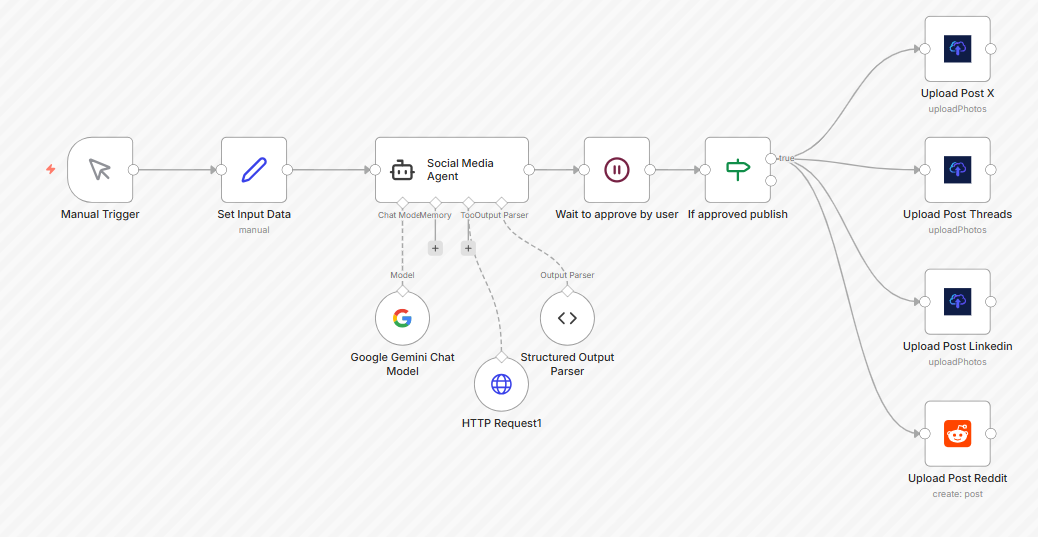
1. Social Media Cross-Posting Automation
Publish content to Twitter/X/LinkedIn and Reddit automatically by posting it once.
How it works in n8n:
- Workflows are initiated by a Cron or manual trigger.
- The Set or HTTP node is responsible for preparing the post text and media.
- Image resizing/formatting can be done via a function or an external API.
- Nodes specific to a platform can publish content.
Objective:This saves countless hours of manual posting, ensures consistency across all platforms, and allows for scheduled publishing.
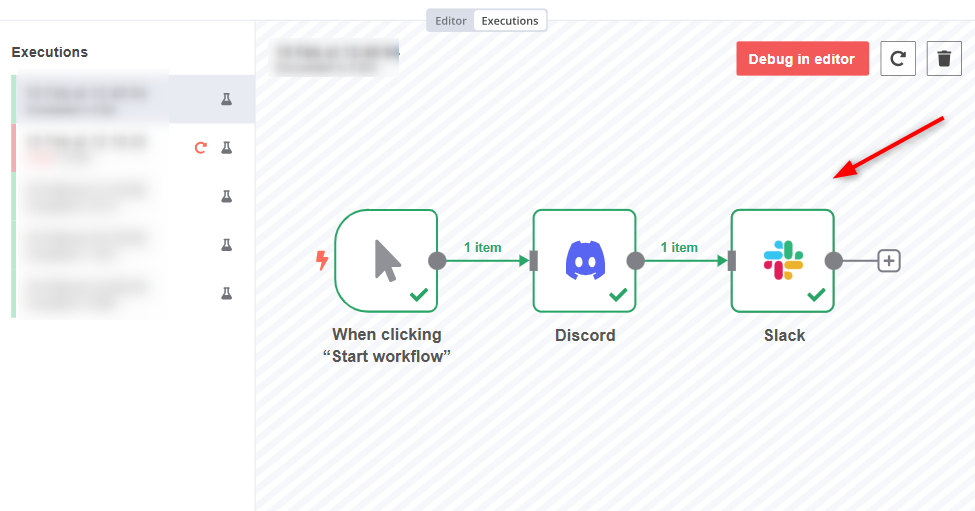
2. Email to Slack / Discord Notifications
Instantly notify your team of:
- New order arrived
- A form is submitted
- A specific keyword appears in an email
How it works:
- Email Triggers or Webhooks detect incoming data.
- The IF node will check for conditions (keywords sent, sender, and subject).
- Nodes for Slack and Discord send alerts to the correct channel.
Objective:Team members can stay up-to-date in real time, without having to constantly check their inboxes and dashboards.
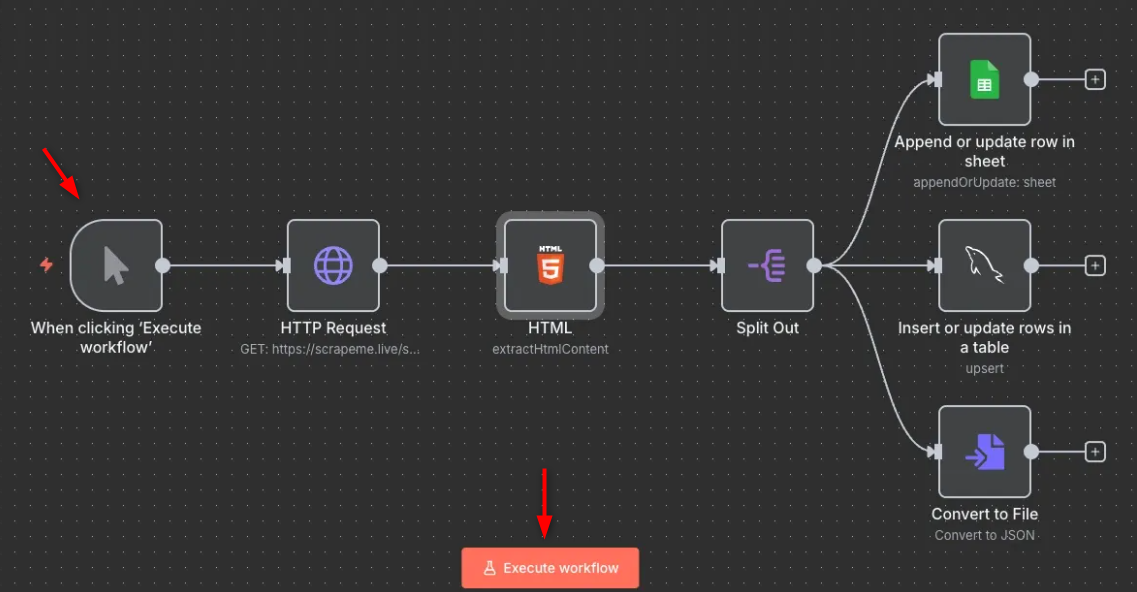
3. Scraping Websites for Useful Information
Monitors websites for changes such as:
- Price drops
- New competitors products
- Postings of apartments or jobs
How it works:
- Cron Trigger runs every hour/day.
- HTTP Request retrieves page data.
- The function node extracts relevant information.
- IF node detects and alerts to changes.
Objective:It transforms n8n into a personal monitoring tool without costly SaaS tools.
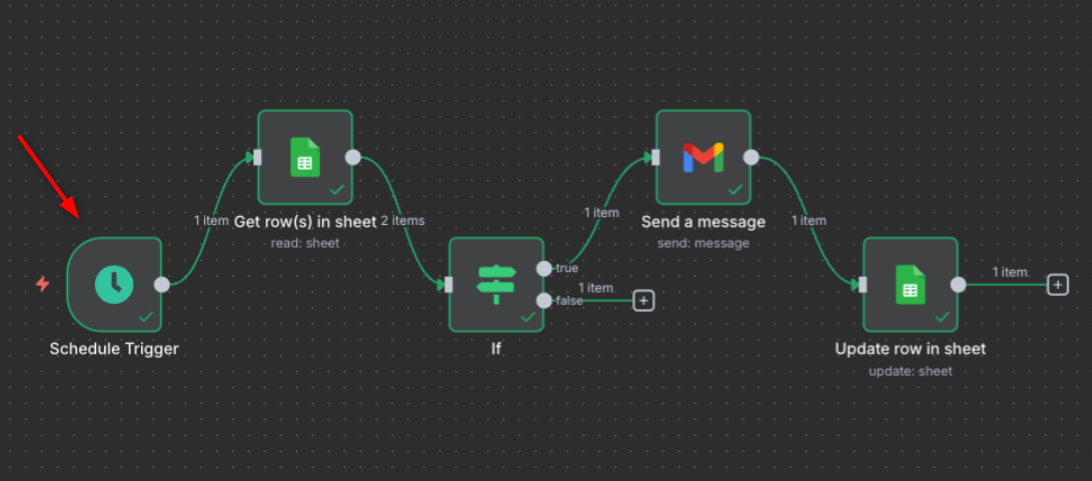
4. Google Sheets Automation
Add new rows to the form when it is submitted. Email alerts are sent when a row is changed.
How it works:
- Webhook or Form Trigger receives input.
- Google Sheets node appends or updates rows.
- Notifications can be sent via email or Slack.
Objective:Perfect for lead tracking, surveys, inventory updates, and simple databases.
5. File Automation Workflows
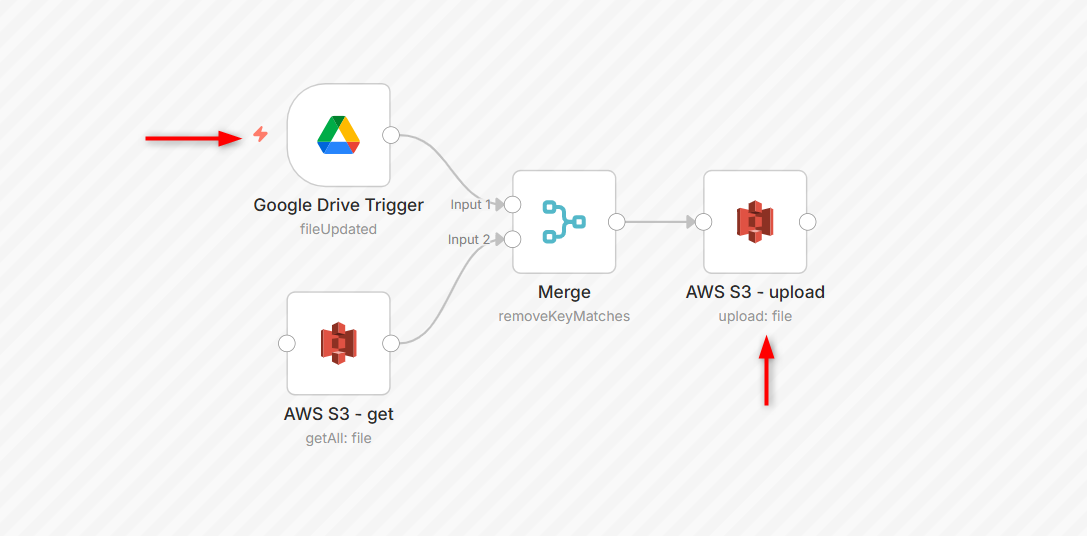
It helps Google Drive, Dropbox, and Amazon S3 synchronize files. Rename uploaded files automatically.
How it works:
- The trigger node detects new files.
- The File Processing Node renames and restructures the files.
- Cloud storage nodes are devices that upload files directly to the target platforms.
Objective:Eliminates repetitive file management and ensures consistent file organization.
6. CRM & Sales Automation
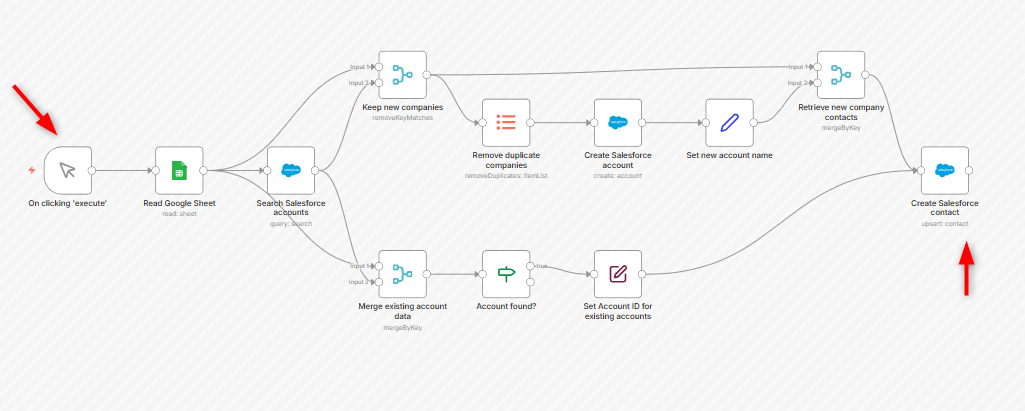
Create contacts automatically in HubSpot, Pipedrive, or Zoho. Sending follow-up emails after a new lead
How it works:
- Lead data is captured by a Webhook or form trigger.
- The CRM node can create or update contacts.
- Email Node automates follow-ups.
Objective:Sales teams respond faster, leads don’t fall through the cracks, and workflows stay consistent.
7. Customer Support Automation
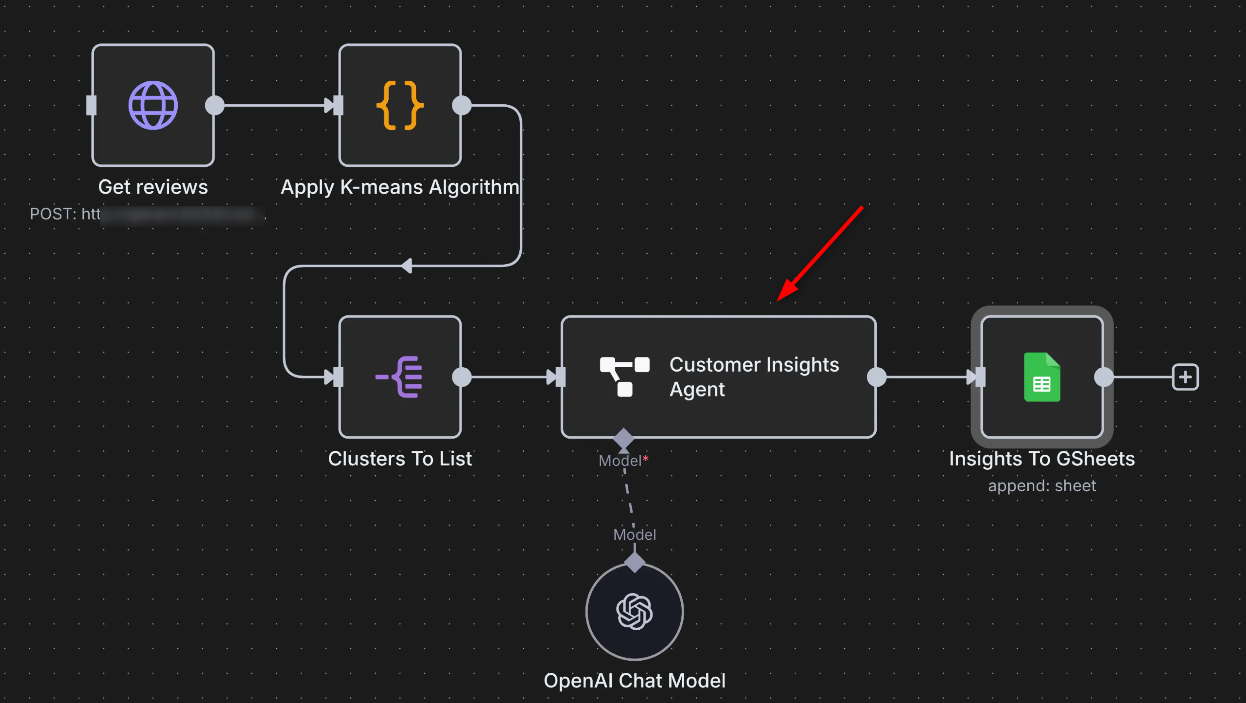
Using n8n, convert emails into support tickets, notifications for new Helpdesk messages, and auto-tag messages using AI.
How it works:
- Email Trigger captures emails of support.
- AI or Function Node analyses content.
- Create or update tickets using the Helpdesk or Ticketing Node.
Objective:The support teams can save time and improve the quality of their responses without having to manually sort.
8. Personal Productivity Automations
Using automation, Notion bookmarks can be saved. Converting long emails into tasks. Weekly productivity summaries are sent.
How it works:
- Webhook or Email Trigger captures data.
- The Notion/Task Management node is used to store tasks or notes.
- Cron Trigger will send you weekly summaries.
Objective:
It transforms n8n into a personal assistant who organizes information in an automated manner.
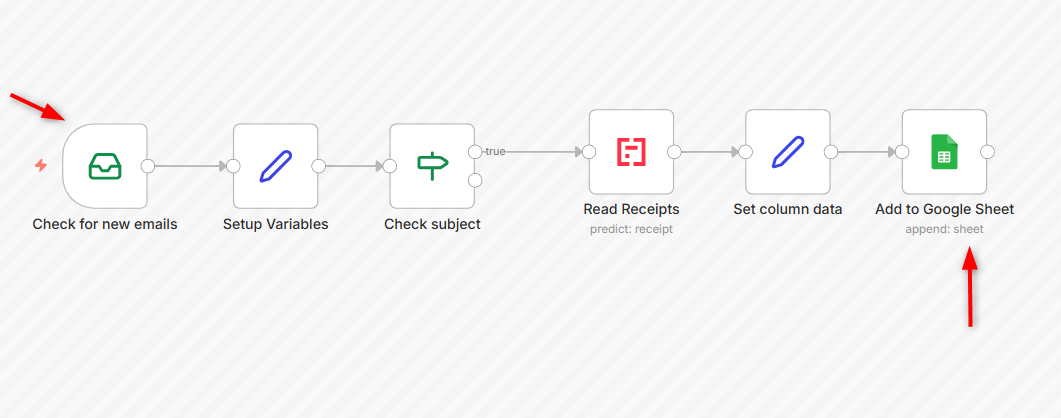
9. API-to-API Connectors
Using n8n, transfers data between services that are not natively integrated. Every hour, the API fetches data from third parties. Updates another API using processed results
How it works:
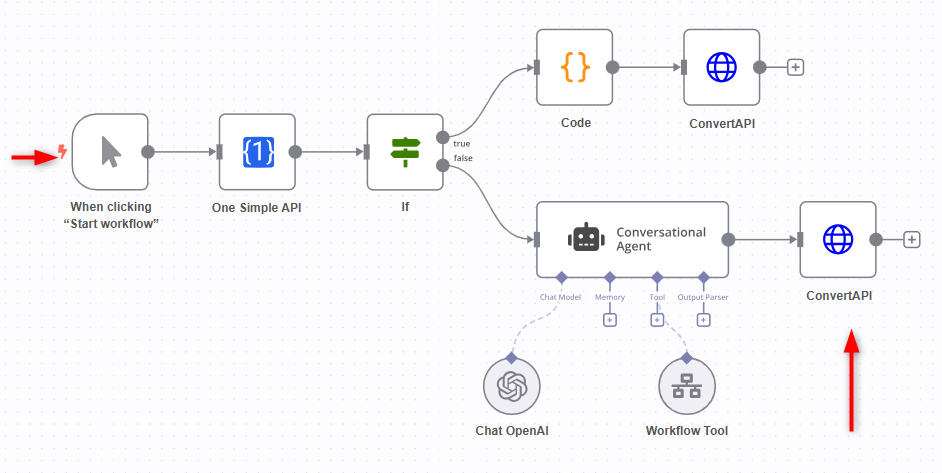
- Cron Trigger or Webhook Trigger initiates the workflow.
- The HTTP Request node fetches data.
- It is transformed by the function node.
- The second API call is used to send the processed data.
Objective:This is a popular automation use case that shows n8n at its best.
That is all from the guide.
Conclusion
These real-world n8n workflows demonstrate how automation can solve everyday issues without complexity. These use cases, which range from social media cross-posting to customer support automation and CRM syncing to API-to-API connectors, reflect what people need and want. These automations are useful for everyone, whether you're an individual creator, freelancer, or growing a team. You can build automated systems quickly by starting with these workflows. They will save you time, reduce mistakes, and grow with your work.
If you want reliable infrastructure to run these automations smoothly, choosing a Cheap VPS service can make all the difference. Start building smarter workflows today with a platform that scales as your automation needs grow.
