With the release of their R1 model, DeepSeek disrupted the AI market. Being open-source, much more efficient, and self-hostable you might want to try it out for yourself. Self-hosing an AI model provides some unique advantages like privacy, customizability, and ease of integration however it also comes with its disadvantages. We will touch on all that in the course of this guide.
Note: DeepSeek-R1 is a 671B model and requires 1.5TB of VRAM for operation which is basically unreachable for any consumer hardware. When we are talking about self-hosting Deepseek we it's worth considering the distilled models like DeepSeek-R1-Distill-Qwen-7B which inherited the reasoning capabilities of DeepSeek while being far easier to slef-host.
Hardware requirements
- Operating System: Any modern Linux distro however, Debian-based distros will make things easier as they are widely used
- Hardware: Modern CPU with at least 16 GB of RAM
- GPU: Not required for the lightest models like 1.5b or 7b but needed for anything more resource intensive. Nvidia GPUs are recomended.
- Software: Python 3.8 or later, Git
- Free disk space: At leat 10 GB for smaller models.
- Tip: For best performance when self-hosting AI models, consider using a Dedicated Server from AlphaVPS .
All of our options provide reliable, always-on infrastructure with modern AMD EPYC CPUs, NVMe storage, and full root access — ideal for running intensive AI workloads or Docker environments with maximum control and privacy.
Installing DeepSeekR1
The process is remarkably simple, just run the following two commands:
curl -fsSL https://ollama.com/install.sh | sh
ollama run deepseek-r1:8b
The 8b part of the second command specifies the parameters. You can select from the following options:
1.5B, Size- 1.1GB
7B, Size- 4.7GB
8B, Size- 4.9GB
14B, Size- 9GB
32B, Size- 20GB
70B, Size- 43GB
671B, Size- 404GB
There are also distilled options for the models which may perform better than the basic downsized models. You can visit the Ollama site to find different distilled models.
Installing OpenWebUI
There are two ways you can install OpenWebUI. With Pip and with Docket. They are both simple so we will cover them both.
With Pip
For best compatibility, make sure that you are using at least Python 3.11. To install the WebUI run the following command:
pip install open-webui
Then to start the server run
open-webui serveThis will start the WebUI on 0.0.0.0:8080. The 4 zeros can be replaced with your server's IP address in order to access it outside the local network.
With Docker
If Docker is not installed on your server you can take a look at the official Docker installation documentation.
If you are going to run Ollama and the WebUI on the same server you can run the following command:
docker run -d -p 3000:8080 --add-host=host.docker.internal:host-gateway -v open-webui:/app/backend/data --name open-webui --restart always ghcr.io/open-webui/open-webui:mainThis will start the WebUI server on 0.0.0.0:3000.The 4 zeros can be replaced with your server's IP address in order to access it outside the local network.
In both cases, you will after you create an admin account you will get the following screen:
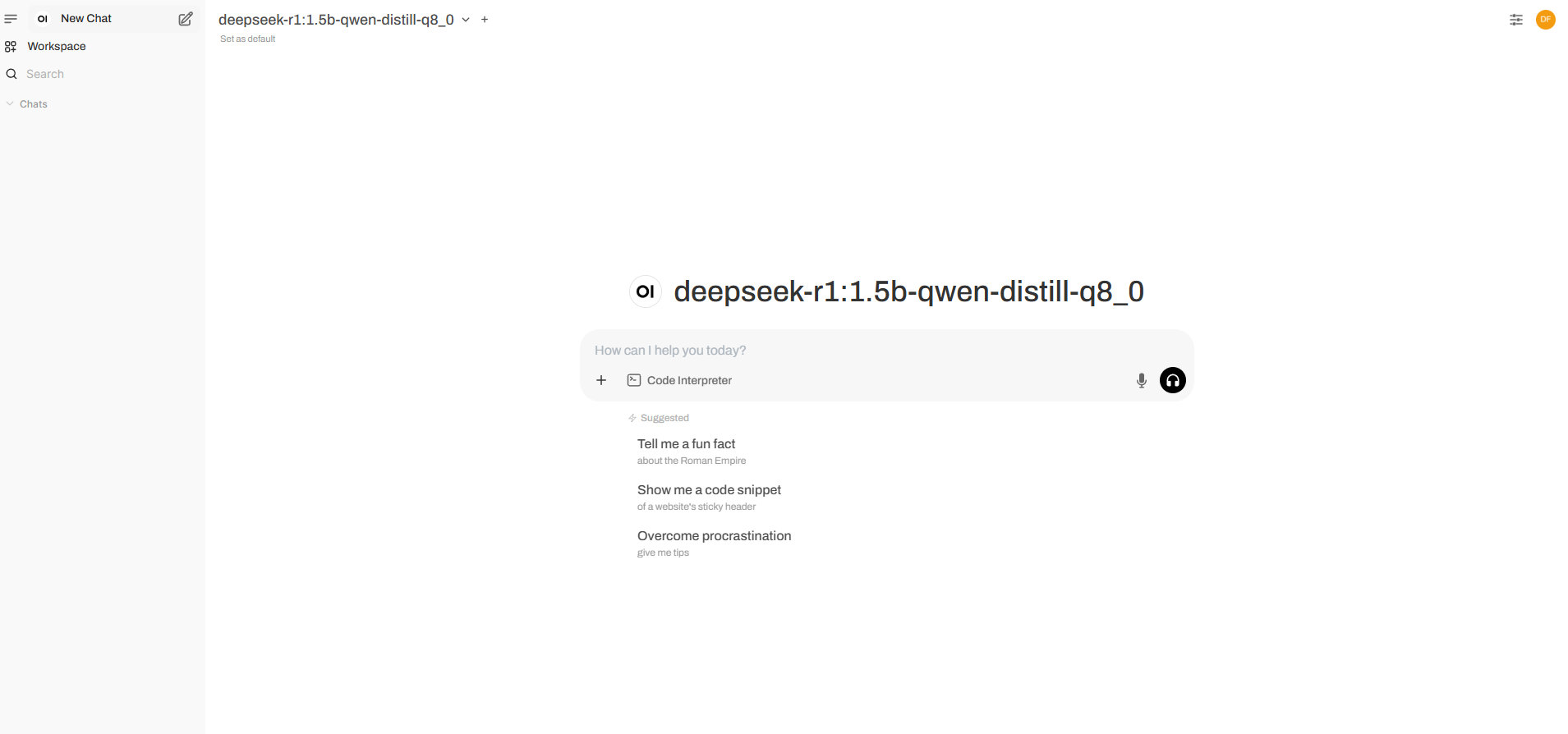
Now you have a fully functional WebUI to chat with your newly self-hosted AI model.
Pros and Cons of self-hosting AI
As you can see from this guide, self-hosting DeepSeek is easy but that doesn't necessarily mean that it's the best choice for your usecase. There are also significant disatnavatages that you must be aware of to make an informed decision. In this section, we will go over some of the pros and cons of the self-hosted approach
Pros
- Enhanced privacy - You can make sure that your data is safe as it never goes through a 3rd party.
- Easy scalability - You can start with a less powerful server running an AI with fewer parameters and scale as per your requirements.
- No queues or delays due to server overload
- Full control over the AI model - You can customize the model's personality, responses, reasoning, and more, providing you with full control and customization.
Cons
- Limited functionality due to hardware limitations - We mentioned ease of scalability as a pro but that is only up to a point. After a certain number of parameters, the hardware requirements become so high that it's unreasonable to achieve with consumer hardware.
- Maintenance - You may need to spend a lot of time to make sure that everything is up-to-date and operational
- High upfront cost - Depending on the setup required, the upfront, or even overall cost may be very high.
- High expertise may be required for some applications
Conclusion
With the release of DeepSeek's R1 self-hosting an AI model has never been easier. If privacy and customizability are what you are after, then self-hosting might be what you are looking for. Even so, you will also need to carefully consider the disadvantages to make sure that self-hosting is right for you.